数据库
oracle数据库自启动和关闭脚本调用
数据库灾备恢复小结
DMS使用文档
Oracle12C安装文档_李光升
Centos配置yum源的操作步骤-李光升
CCS数据库突然卡顿问题解决-徐铭
Centos 7.9静默安装oracle 12cR2详细步骤
mysql5.7数据库sql语句数据类型隐式转换的反逻辑BUG
RDS MySQL临时文件导致实例磁盘空间满且出现“锁定中”状态
关于Mysql引擎Myisam和InnoDB的使用
MySQL查询语句中in和exists区别详解-知识点
Mysql 的存储过程中 WITH AS 的语法和使用
Mysql 性能调优-详解
oracle数据库DG搭建
SUSE linux 配置时钟同步服务NTP/Chrony
oracle数据库实例开启操作文档
oracle数据库实例关闭操作文档
oracle数据库DBS备份配置文档v2
ALiYun ECS CENTOS数据上传到OSS操作手册
Oracle - LOGMINER配置方法
oracle sysaux表空间爆满清理unified auditing数据
sysaux表空间爆满WRI$_ADV_OBJECTS占用严重
SAP权限对象
SYSAUX表空间WRI$\_ADV\_OBJECTS表过大清理V2
oracle:表访问方式
ORA性能诊断调优
数据字典(DICT)和性能事件类型(EVENT)
日志挖掘LogMiner
RMAN sql_id “0az7czjdw8z7j” 执行计划异常
Oracle11g Active Data Guard搭建、管理
ORACLE LOGMINER配置v2
oracle日志组调整
ECS linux服务器挂载nas磁盘失败
oracle数据库修改字符集
datapump数据泵导入导出
OA系统数据库ADG架构搭建
IPS数据库SQL执行异常:ORA-00600
oracle 12c 创建PDB
oracle数据库监听异常
lvm:阿里云磁盘扩容,lvm扩容
Redis基本操作
SAP S4 CLIENT COPY(800->400)
日常数据库操作
PGSQL操作
# ORA-00054: resource busy问题处理
OA数据库服务器故障分析报告
CCS数据库生产数据库(北京中心)覆盖到VER环境数据库(乌兰察布):使用nonpdb to pdb迁移方式
WINDOWS环境Django框架连接MySQL数据库配置
Django开发学习实战
什么是向量嵌入?
OA数据库服务器内次异常增长问题分析
基于AI的自动化服务器管理
AI技术发展趋势及其在农牧食品行业的创新应用
IPS数据库日志表数据归档&表分区
国产编程模型GLM-4.6海外爆火:性能媲美ClaudeSonnet,性价比优势显著
免费开源的零代码平台 / 无代码平台,敲敲云 v2.2.0 版本
数据库原理与应用
AI发展近况分析
ORACLE ADG环境下解除ADG关系并激活备库为独立数据库
麦肯锡重磅报告:关于未来的生存指南,当57%的工作被自动化,我们如何与AI结成利益共同体
【Oracle】Cursor(游标)
ORACLE数据库在曾经的备库(路径一致)进行不完全恢复
获取执行计划的6种方法
人工智能行业的发展已进入“系统竞争”时代
2026年AI与机器人发展趋势
事务未提交导致行锁等待问题处理
MongoDB日常操作命令
2026年人工智能前沿技术趋势与应用落地分析
Doris开发
人工智能在数据库运维工作中的应用趋势与落地场景研究
帆软报表开发学习
AI 助手在 Oracle DBA 工作中的辅助能力研究报告
AI原生数据库发展趋势白皮书
OpenClaw数据库管理应用实践
Apache Doris 简介
AI在实际工作中的应用案例分享
人形机器人现状
从十大AI技术趋势,窥见“未来”
AI 在辅助投资股票方面的落地方案与实际使用价值
从原理到实践,一文读懂主流 AI 技术
AI Agent 从零开始学习路线图
AI 驱动的内容生产工作流探索 —— 基于微信公众号文章编写与视频号视频生成的实践
本文档使用「觅思文档专业版」发布
-
+
首页
OA系统数据库ADG架构搭建
# OA系统数据库ADG架构搭建 1. 一、安装oracle软件 1. ........ 2. ........ 3. [oracle@oa-db-standby etc]$ vim db\_install.rsp 4. [oracle@oa-db-standby etc]$ ll 5. total 76 6. -rwx------ 1 oracle oinstall 44969 Aug 15 15:37 dbca.rsp 7. -rwx------ 1 oracle oinstall 22741 Aug 15 17:00 db\_install.rsp 8. -rwx------ 1 oracle oinstall 5740 Aug 15 15:37 netca.rsp 9. [oracle@oa-db-standby etc]$ cd /tqls\_system/software/linux.x64\_11gR2\_database/database/ 10. doc/ response/ runInstaller stage/ 11. install/ rpm/ sshsetup/ welcome.html 12. [oracle@oa-db-standby etc]$ cd /tqls\_system/software/linux.x64\_11gR2\_database/database 13. [oracle@oa-db-standby database]$ ./runInstaller -silent -responseFile /home/oracle/etc/db\_install.rsp 14. Starting Oracle Universal Installer... 15. Checking Temp space: must be greater than 120 MB. Actual 36122 MB Passed 16. Checking swap space: must be greater than 150 MB. Actual 4095 MB Passed 17. Preparing to launch Oracle Universal Installer from /tmp/OraInstall2024-08-15\_05-00-49PM. Please wait ...[oracle@oa-db-standby database]$ [WARNING] [INS-13014] Target environment do not meet some optional requirements. 18. CAUSE: Some of the optional prerequisites are not met. See logs for details. /tmp/OraInstall2024-08-15\_05-00-49PM/installActions2024-08-15\_05-00-49PM.log 19. ACTION: Identify the list of failed prerequisite checks from the log: /tmp/OraInstall2024-08-15\_05-00-49PM/installActions2024-08-15\_05-00-49PM.log. Then either from the log file or from installation manual find the appropriate configuration to meet the prerequisites and fix it manually. 20. [WARNING] [INS-13014] Target environment do not meet some optional requirements. 21. CAUSE: Some of the optional prerequisites are not met. See logs for details. /tmp/OraInstall2024-08-15\_05-00-49PM/installActions2024-08-15\_05-00-49PM.log 22. ACTION: Identify the list of failed prerequisite checks from the log: /tmp/OraInstall2024-08-15\_05-00-49PM/installActions2024-08-15\_05-00-49PM.log. Then either from the log file or from installation manual find the appropriate configuration to meet the prerequisites and fix it manually. 23. You can find the log of this install session at: 24. /tqls\_system/app/inventory/logs/installActions2024-08-15\_05-00-49PM.log 25. The following configuration scripts need to be executed as the "root" user. 26. #!/bin/sh 27. #Root scripts to run 28. /tqls\_system/app/inventory/orainstRoot.sh 29. /tqls\_system/app/oracle/product/11.2.0/dbhome\_1/root.sh 30. To execute the configuration scripts: 31. 1. Open a terminal window 32. 2. Log in as "root" 33. 3. Run the scripts 34. 4. Return to this window and hit "Enter" key to continue 35. Successfully Setup Software. 2. 二、ADG搭建 1. 1.创建实例: 1. 1)编辑配置文件:vim /etc/dbca.rsp 2. 2)执行静默安装实例语句:dbca -silent -createDatabase -responseFile /home/oracle/etc/dbca.rsp 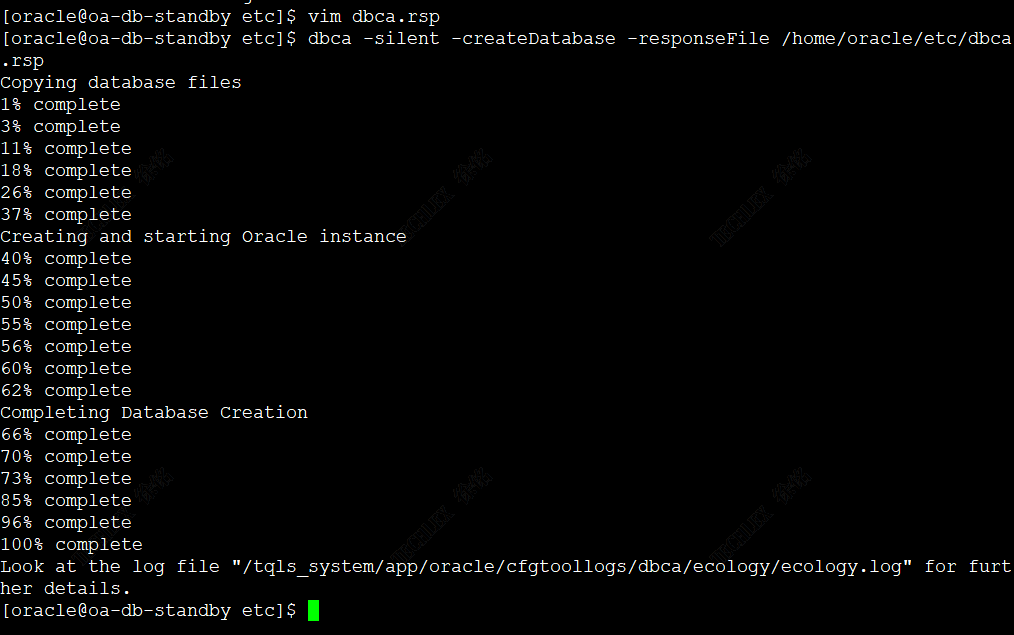 * 1. 2.配置主备库的hosts文件 1. 1)主库:vim /etc/hosts  * + 1. 2)备库:vim /etc/hosts  * 1. 3.配置主备库的listener.ora文件 1. 1)主库listener.ora文件配置 1. [oracle@OA-DATABASE-PRD2022 admin]$ cp listener.ora listener.ora.bak240820 2. [oracle@OA-DATABASE-PRD2022 admin]$ cat listener.ora 3. # listener.ora Network Configuration File: /tqls\_system/app/oracle/product/11.2.0/dbhome\_1/network/admin/listener.ora 4. # Generated by Oracle configuration tools. 5. SID\_LIST\_LISTENER = 6. (SID\_LIST = 7. (SID\_DESC = 8. (SDU=32767) 9. (GLOBAL\_DBNAME = ecology) 10. (ORACLE\_HOME =/tqls\_system/app/oracle/product/11.2.0/dbhome\_1) 11. (SID\_NAME = ecology) 12. ) 13. ) 14. LISTENER = 15. (DESCRIPTION\_LIST = 16. (DESCRIPTION = 17. (ADDRESS = (PROTOCOL = TCP)(HOST = OA-DATABASE-PRD2022)(PORT = 1521)) 18. (ADDRESS = (PROTOCOL = IPC)(KEY = EXTPROC1521)) 19. ) 20. ) 21. ADR\_BASE\_LISTENER =/tqls\_system/app/oracle 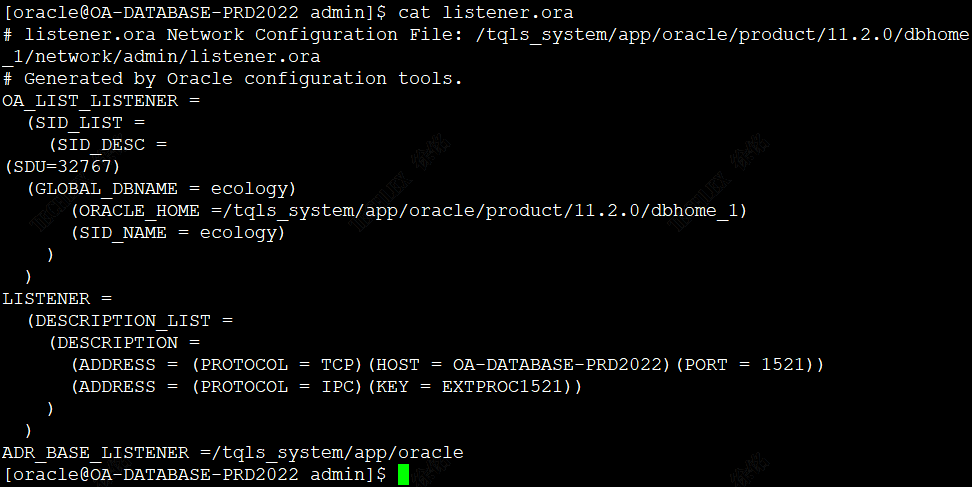 * + 1. 2)备库listener.ora文件配置 1. [oracle@oa-db-standby admin]$ cat listener.ora 2. SID\_LIST\_LISTENER= 3. (SID\_LIST= 4. (SID\_DESC= 5. (SDU=32767) 6. (GLOBAL\_DBNAME=ECOLOGY\_STD) 7. (SID\_NAME=ecology) 8. (ORACLE\_HOME=/tqls\_system/app/oracle/product/11.2.0/dbhome\_1) 9. ) 10. ) 11. LISTENER = 12. (DESCRIPTION\_LIST = 13. (DESCRIPTION = 14. (ADDRESS = (PROTOCOL = TCP)(HOST = oa-db-standby)(PORT = 1521)) 15. (ADDRESS = (PROTOCOL = IPC)(KEY = EXTPROC1521)) 16. ) 17. ) 18. ADR\_BASE\_LISTENER =/tqls\_system/app/oracle 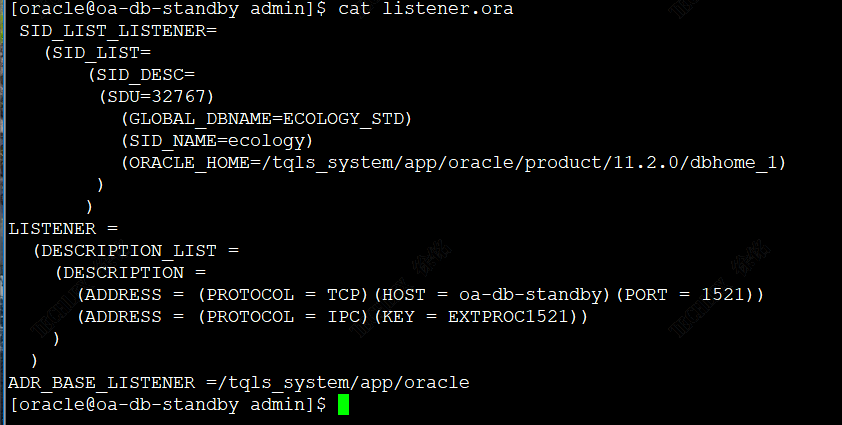 * 1. 4.配置主备库的tnsnames.ora文件 1. 1)主库tnsnames.ora文件配置 1. [oracle@OA-DATABASE-PRD2022 admin]$ cat tnsnames.ora 2. # tnsnames.ora Network Configuration File: /tqls\_system/app/oracle/product/11.2.0/dbhome\_1/network/admin/tnsnames.ora 3. # Generated by Oracle configuration tools. 4. ecology= 5. (DESCRIPTION = 6. (SDU=32767) 7. (ADDRESS = (PROTOCOL =TCP)(HOST = OA-DATABASE-PRD2022)(PORT = 1521)) 8. (CONNECT\_DATA = 9. (SERVER = DEDICATED) 10. (SERVICE\_NAME = ecology.OA-DATABASE-PRD) 11. ) 12. ) 13. ecology\_std = 14. (DESCRIPTION = 15. (SDU=32767) 16. (ADDRESS = (PROTOCOL =TCP)(HOST = oa-db-standby)(PORT = 1521)) 17. (CONNECT\_DATA = 18. (SERVER = DEDICATED) 19. (SERVICE\_NAME = ECOLOGY\_STD.OA-DB-STANDBY) 20. ) 21. ) 22. for\_db = 23. (DESCRIPTION = 24. (ADDRESS = (PROTOCOL =TCP)(HOST = OA-DATABASE-PRD2022)(PORT = 1521)) 25. ) 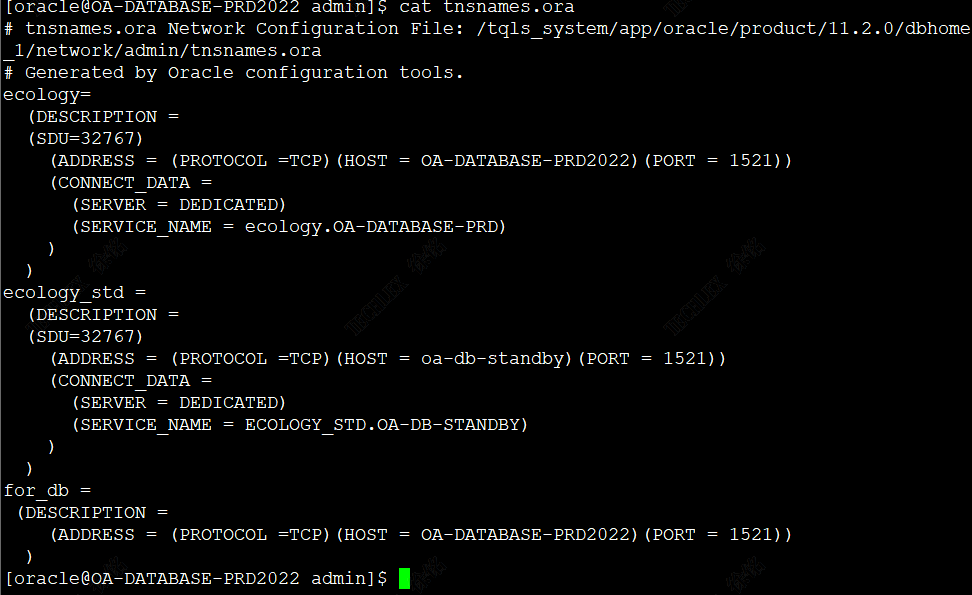 * + 1. 2)备库tnsnames.ora文件配置 1. [oracle@oa-db-standby admin]$ cat tnsnames.ora 2. ecology= 3. (DESCRIPTION = 4. (SDU=32767) 5. (ADDRESS = (PROTOCOL =TCP)(HOST = OA-DATABASE-PRD2022)(PORT = 1521)) 6. (CONNECT\_DATA = 7. (SERVER = DEDICATED) 8. (SERVICE\_NAME = ecology.OA-DATABASE-PRD) 9. ) 10. ) 11. ecology\_std = 12. (DESCRIPTION = 13. (SDU=32767) 14. (ADDRESS = (PROTOCOL =TCP)(HOST = oa-db-standby)(PORT = 1521)) 15. (CONNECT\_DATA = 16. (SERVER = DEDICATED) 17. (SERVICE\_NAME = ECOLOGY\_STD.OA-DB-STANDBY) 18. ) 19. ) 20. for\_db = 21. (DESCRIPTION = 22. (ADDRESS = (PROTOCOL =TCP)(HOST = oa-db-standby)(PORT = 1521)) 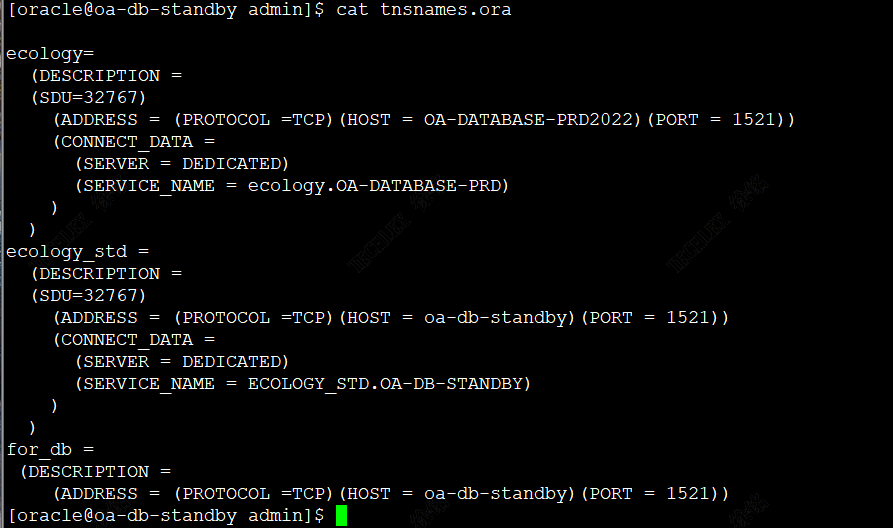 * + 1. 3)检查主库连接名tnsping 1. [oracle@OA-DATABASE-PRD2022 admin]$ tnsping ecology 2. TNS Ping Utility for Linux: Version 11.2.0.1.0 - Production on 21-AUG-2024 10:15:02 3. Copyright (c) 1997, 2009, Oracle. All rights reserved. 4. Used parameter files: 5. /tqls\_system/app/oracle/product/11.2.0/dbhome\_1/network/admin/sqlnet.ora 6. Used TNSNAMES adapter to resolve the alias 7. Attempting to contact (DESCRIPTION = (SDU=32767) (ADDRESS = (PROTOCOL =TCP)(HOST = OA-DATABASE-PRD2022)(PORT = 1521)) (CONNECT\_DATA = (SERVER = DEDICATED) (SERVICE\_NAME = ecology.OA-DATABASE-PRD))) 8. OK (0 msec) 9. [oracle@OA-DATABASE-PRD2022 admin]$ tnsping ecology\_std 10. TNS Ping Utility for Linux: Version 11.2.0.1.0 - Production on 21-AUG-2024 10:15:10 11. Copyright (c) 1997, 2009, Oracle. All rights reserved. 12. Used parameter files: 13. /tqls\_system/app/oracle/product/11.2.0/dbhome\_1/network/admin/sqlnet.ora 14. Used TNSNAMES adapter to resolve the alias 15. Attempting to contact (DESCRIPTION = (SDU=32767) (ADDRESS = (PROTOCOL =TCP)(HOST = oa-db-standby)(PORT = 1521)) (CONNECT\_DATA = (SERVER = DEDICATED) (SERVICE\_NAME = ECOLOGY\_STD.OA-DB-STANDBY))) 16. OK (10 msec) 17. [oracle@OA-DATABASE-PRD2022 admin]$ 2. 4)检查备库连接名tnsping 1. [oracle@oa-db-standby admin]$ tnsping ecology 2. TNS Ping Utility for Linux: Version 11.2.0.1.0 - Production on 21-AUG-2024 10:15:50 3. Copyright (c) 1997, 2009, Oracle. All rights reserved. 4. Used parameter files: 5. Used TNSNAMES adapter to resolve the alias 6. Attempting to contact (DESCRIPTION = (SDU=32767) (ADDRESS = (PROTOCOL =TCP)(HOST = OA-DATABASE-PRD2022)(PORT = 1521)) (CONNECT\_DATA = (SERVER = DEDICATED) (SERVICE\_NAME = ecology.OA-DATABASE-PRD))) 7. OK (0 msec) 8. [oracle@oa-db-standby admin]$ tnsping ecology\_std 9. TNS Ping Utility for Linux: Version 11.2.0.1.0 - Production on 21-AUG-2024 10:15:59 10. Copyright (c) 1997, 2009, Oracle. All rights reserved. 11. Used parameter files: 12. Used TNSNAMES adapter to resolve the alias 13. Attempting to contact (DESCRIPTION = (SDU=32767) (ADDRESS = (PROTOCOL =TCP)(HOST = oa-db-standby)(PORT = 1521)) (CONNECT\_DATA = (SERVER = DEDICATED) (SERVICE\_NAME = ECOLOGY\_STD.OA-DB-STANDBY))) 14. OK (10 msec) 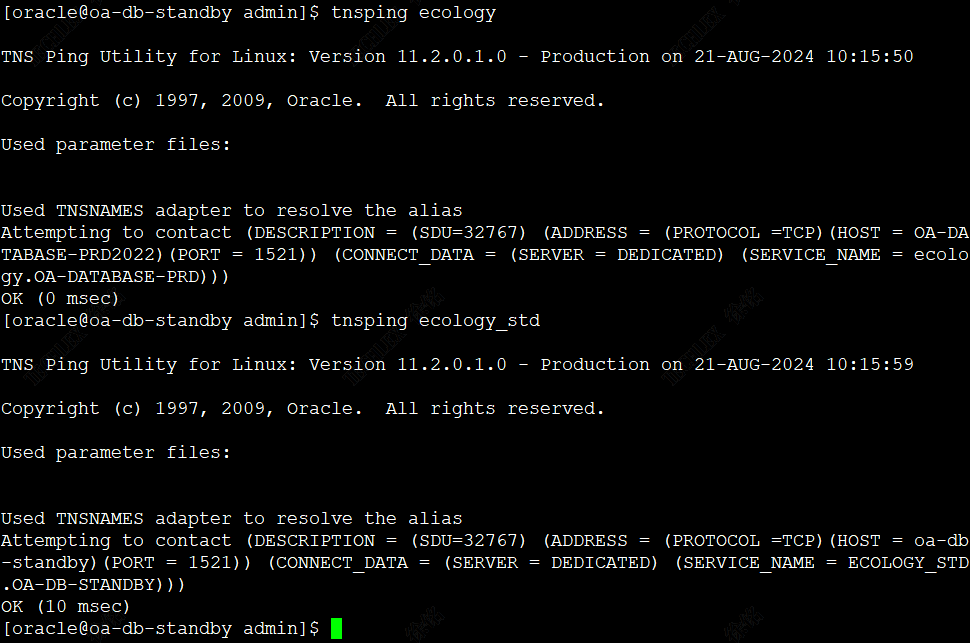 * 1. 5.主库DG配置 1. 1)开启force logging模式 1. SQL> alter database force logging; 2. Database altered. 3. SQL> select open\_mode,log\_mode,force\_logging,flashback\_on from v$database; 4. OPEN\_MODE LOG\_MODE FOR FLASHBACK\_ON 5. -------------------- ------------ --- ------------------ 6. READ WRITE ARCHIVELOG YES NO 7. SQL> 2. 2)设置 db\_unique\_name參数(跳过此步骤) 1. SQL> show parameter db\_unique\_name; 2. SQL> alter system set db\_unique\_name=ecology scope=spfile; 3. 3)主库 Data Guard配置备库信息 1. SQL> alter system set log\_archive\_config = 'dg\_config=(ecology,ECOLOGY\_STD)'; 2. 说明alter system set log\_archive\_config = 'dg\_config=(参数1,参数2)'; 3. 参数1:主库db\_unique\_name 4. 参数2:备库db\_unique\_name 4. 4)配置归档位置和重做日志传输 1. SQL> alter system set log\_archive\_dest\_1 = 'location=use\_db\_recovery\_file\_dest valid\_for=(all\_logfiles, all\_roles) db\_unique\_name=ecology'; 5. 5)配置重做日志传输到备库 1. SQL> alter system set log\_archive\_dest\_2 = 'service=ECOLOGY\_STD.OA-DB-STANDBY lgwr sync valid\_for=(online\_logfile,primary\_role) db\_unique\_name=ECOLOGY\_STD'; 6. 6)设置參数 FAL\_SERVER 1. SQL> alter system set fal\_server='ECOLOGY\_STD'; 7. 7)当主库加入或删除数据文件时,这些文件也会在备库加入或删除 1. SQL> alter system set standby\_file\_management=auto; 8. 8)加入备用日志(standby redo ) 1. alter database add standby logfile thread 1 group 11 ('/tqls\_system/app/oracle/oradata/ecology/std\_redo11.log') size 1G; 2. alter database add standby logfile thread 1 group 12 ('/tqls\_system/app/oracle/oradata/ecology/std\_redo12.log') size 1G; 3. alter database add standby logfile thread 1 group 13 ('/tqls\_system/app/oracle/oradata/ecology/std\_redo13.log') size 1G; 4. alter database add standby logfile thread 1 group 14 ('/tqls\_system/app/oracle/oradata/ecology/std\_redo14.log') size 1G; 5. alter database add standby logfile thread 1 group 15 ('/tqls\_system/app/oracle/oradata/ecology/std\_redo15.log') size 1G; 9. 9)其他 1. SQL> alter system set local\_listener='for\_db'; 10. 10)创建主库pfile,并传输到备库 1. create pfile='/home/oracle/initecology\_standby.ora' from spfile; 2. 6.备库DG配置 1. 1)修改备库的参数 1. SQL> show parameter db\_domain 2. NAME TYPE VALUE 3. ------------------------------------ ----------- ------------------------------ 4. db\_domain string OA-DB-STANDBY 5. SQL> 6. SQL> 7. SQL> show parameter control\_file 8. NAME TYPE VALUE 9. ------------------------------------ ----------- ------------------------------ 10. control\_file\_record\_keep\_time integer 7 11. control\_files string /tqls\_system/app/oracle/oradat 12. a/ecology/control01.ctl, /tqls 13. \_system/app/oracle/flash\_recov 14. ery\_area/ecology/control02.ctl 15. SQL> show parameter db\_name 16. NAME TYPE VALUE 17. ------------------------------------ ----------- ------------------------------ 18. db\_name string ecology 19. SQL> show parameter fal\_server 20. NAME TYPE VALUE 21. ------------------------------------ ----------- ------------------------------ 22. fal\_server string 23. SQL> alter system set fal\_server='ecology'; 24. System altered. 25. SQL> show parameter fal\_server 26. NAME TYPE VALUE 27. ------------------------------------ ----------- ------------------------------ 28. fal\_server string ecology 29. SQL> show parameter local\_listener 30. NAME TYPE VALUE 31. ------------------------------------ ----------- ------------------------------ 32. local\_listener string 33. SQL> alter system set local\_listener='for\_db'; 34. alter system set local\_listener='for\_db' 35. * 36. ERROR at line 1: 37. ORA-02097: parameter cannot be modified because specified value is invalid 38. ORA-00119: invalid specification for system parameter LOCAL\_LISTENER 39. ORA-00132: syntax error or unresolved network name 'for\_db' 40. SQL> show parameter log\_archive\_config 41. NAME TYPE VALUE 42. ------------------------------------ ----------- ------------------------------ 43. log\_archive\_config string 44. SQL> alter system set log\_archive\_config='dg\_config=(ecology,ECOLOGY\_STD)' 45. 2 ; 46. System altered. 47. SQL> alter system set log\_archive\_dest\_1='location=use\_db\_recovery\_file\_dest valid\_for=(all\_logfiles, all\_roles) db\_unique\_name=ECOLOGY\_STD' 48. 2 ; 49. System altered. 50. SQL> alter system set log\_archive\_dest\_2='service=ecology.OA-DATABASE-PRD lgwr sync valid\_for=(online\_logfile,primary\_role) db\_unique\_name=ecology' 51. 2 ; 52. System altered. 53. SQL> alter system set standby\_file\_management='AUTO'; 54. System altered. 55. SQL> create pfile from spfile; 56. File created. 57. SQL> alter system set local\_listener='for\_db' scope=spfile; 58. System altered. 59. SQL> shutdown immediate 60. Database closed. 61. Database dismounted. 62. ORACLE instance shut down. 63. SQL> startup 64. ORACLE instance started. 65. Total System Global Area 6480490496 bytes 66. Fixed Size 2213816 bytes 67. Variable Size 3489663048 bytes 68. Database Buffers 2952790016 bytes 69. Redo Buffers 35823616 bytes 70. Database mounted. 71. Database opened. 72. SQL> 2. 2)在主库备份控制文件 1. RMAN> run{ 2. 2> allocate channel t1 type disk; 3. 3> backup current controlfile for standby format '/nas\_oa/other/temp/control\_standby822.bkp'; 4. 4> release CHANNEL t1; 5. 5> } 6. using target database control file instead of recovery catalog 7. allocated channel: t1 8. channel t1: SID=1362 device type=DISK 9. Starting backup at 22-AUG-24 10. channel t1: starting full datafile backup set 11. channel t1: specifying datafile(s) in backup set 12. including standby control file in backup set 13. channel t1: starting piece 1 at 22-AUG-24 14. channel t1: finished piece 1 at 22-AUG-24 15. piece handle=/nas\_oa/other/temp/control\_standby822.bkp tag=TAG20240822T160252 comment=NONE 16. Finished backup at 22-AUG-24 17. released channel: t1 3. 3)在备库恢复控制文件 1. [oracle@oa-db-standby temp]$ rman target / 2. Recovery Manager: Release 11.2.0.1.0 - Production on Thu Aug 22 16:04:38 2024 3. Copyright (c) 1982, 2009, Oracle and/or its affiliates. All rights reserved. 4. connected to target database: ECOLOGY (not mounted) 5. RMAN> restore controlfile from '/nas\_oa/other/temp/control\_standby822.bkp'; 6. Starting restore at 22-AUG-24 7. using target database control file instead of recovery catalog 8. allocated channel: ORA\_DISK\_1 9. channel ORA\_DISK\_1: SID=156 device type=DISK 10. channel ORA\_DISK\_1: restoring control file 11. channel ORA\_DISK\_1: restore complete, elapsed time: 00:00:01 12. output file name=/tqls\_system/app/oracle/oradata/ecology/control01.ctl 13. output file name=/tqls\_system/app/oracle/flash\_recovery\_area/ecology/control02.ctl 14. Finished restore at 22-AUG-24 15. RMAN> alter database mount; 16. database mounted 17. released channel: ORA\_DISK\_1 4. 4)rman连接主库与备库 1. [oracle@oa-db-standby admin]$ rman target sys/admin2024@ecology auxiliary sys/admin2024@ecology\_std 2. Recovery Manager: Release 11.2.0.1.0 - Production on Thu Aug 22 16:11:16 2024 3. Copyright (c) 1982, 2009, Oracle and/or its affiliates. All rights reserved. 4. connected to target database: ECOLOGY (DBID=4251925582) 5. connected to auxiliary database: ECOLOGY (DBID=4251925582, not open) 6. RMAN> 5. 5)rman通过网络在线duplication复制主库数据库到备库:报错提示auxiliary db没打开 1. RMAN> run{ 2. 2> allocate channel t1 type disk; 3. 3> duplicate target database for standby nofilenamecheck from active database; 4. 4> release CHANNEL t1; 5. 5> } 6. using target database control file instead of recovery catalog 7. allocated channel: t1 8. channel t1: SID=104 device type=DISK 9. Starting Duplicate Db at 22-AUG-24 10. released channel: t1 11. RMAN-00571: =========================================================== 12. RMAN-00569: =============== ERROR MESSAGE STACK FOLLOWS =============== 13. RMAN-00571: =========================================================== 14. RMAN-03002: failure of Duplicate Db command at 08/22/2024 16:12:27 15. RMAN-05500: the auxiliary database must be not mounted when issuing a DUPLICATE command 6. 6)用主库传过来的pfile重启数据库到nomount 1. SQL> startup nomount pfile='/tqls\_system/app/oracle/product/11.2.0/dbhome\_1/dbs/initecology\_standby.ora'; 2. [oracle@oa-db-standby dbs]$ lsnrctl status 3. LSNRCTL for Linux: Version 11.2.0.1.0 - Production on 22-AUG-2024 17:18:14 4. Copyright (c) 1991, 2009, Oracle. All rights reserved. 5. Connecting to (ADDRESS=(PROTOCOL=tcp)(HOST=)(PORT=1521)) 6. STATUS of the LISTENER 7. ------------------------ 8. Alias LISTENER 9. Version TNSLSNR for Linux: Version 11.2.0.1.0 - Production 10. Start Date 22-AUG-2024 17:11:39 11. Uptime 0 days 0 hr. 6 min. 35 sec 12. Trace Level off 13. Security ON: Local OS Authentication 14. SNMP OFF 15. Listener Parameter File /tqls\_system/app/oracle/product/11.2.0/dbhome\_1/network/admin/listener.ora 16. Listener Log File /tqls\_system/app/oracle/diag/tnslsnr/oa-db-standby/listener/alert/log.xml 17. Listening Endpoints Summary... 18. (DESCRIPTION=(ADDRESS=(PROTOCOL=tcp)(HOST=oa-db-standby)(PORT=1521))) 19. Services Summary... 20. Service "ecology.OA-DB-STANDBY" has 1 instance(s). 21. Instance "ecology", status BLOCKED, has 1 handler(s) for this service... 22. The command completed successfully 7. 7)调整监听文件 1. [oracle@oa-db-standby admin]$ cat listener.ora 2. # listener.ora 3. LISTENER = 4. (DESCRIPTION\_LIST = 5. (DESCRIPTION = 6. (ADDRESS = (PROTOCOL = TCP)(HOST = oa-db-standby)(PORT = 1521)) 7. (ADDRESS = (PROTOCOL = IPC)(KEY = EXTPROC1521)) 8. ) 9. ) 10. SID\_LIST\_LISTENER = 11. (SID\_LIST = 12. (SID\_DESC = 13. (GLOBAL\_DBNAME = ECOLOGY\_STD) 14. (ORACLE\_HOME = /tqls\_system/app/oracle/product/11.2.0/dbhome\_1) 15. (SID\_NAME = ecology) 16. ) 17. ) 18. ADR\_BASE\_LISTENER =/tqls\_system/app/oracle 8. 8)重新启动数据库(用pfile的全路径启动数据库到nomount) 1. SQL> shutdown immediate 2. ORA-01507: database not mounted 3. ORACLE instance shut down. 4. SQL> startup nomount pfile='initecology\_standby.ora'; 5. LRM-00109: could not open parameter file 'initecology\_standby.ora' 6. ORA-01078: failure in processing system parameters 7. SQL> startup nomount pfile='/tqls\_system/app/oracle/product/11.2.0/dbhome\_1/dbs/initecology\_standby.ora'; 8. ORACLE instance started. 9. Total System Global Area 6413680640 bytes 10. Fixed Size 2213776 bytes 11. Variable Size 1207961712 bytes 12. Database Buffers 5167382528 bytes 13. Redo Buffers 36122624 bytes 14. SQL> 9. 9)rman同时连接主库和备库(连接成功) 1. [oracle@oa-db-standby dbs]$ rman target sys/admin2024@ecology auxiliary sys/admin2024@ecology\_std 2. Recovery Manager: Release 11.2.0.1.0 - Production on Fri Aug 23 10:18:31 2024 3. Copyright (c) 1982, 2009, Oracle and/or its affiliates. All rights reserved. 4. connected to target database: ECOLOGY (DBID=4251925582) 5. RMAN-00571: =========================================================== 6. RMAN-00569: =============== ERROR MESSAGE STACK FOLLOWS =============== 7. RMAN-00571: =========================================================== 8. RMAN-00554: initialization of internal recovery manager package failed 9. RMAN-04006: error from auxiliary database: ORA-12514: TNS:listener does not currently know of service requested in connect descriptor 10. [oracle@oa-db-standby dbs]$ 11. [oracle@oa-db-standby admin]$ lsnrctl status 12. LSNRCTL for Linux: Version 11.2.0.1.0 - Production on 23-AUG-2024 10:32:21 13. Copyright (c) 1991, 2009, Oracle. All rights reserved. 14. Connecting to (DESCRIPTION=(ADDRESS=(PROTOCOL=TCP)(HOST=oa-db-standby)(PORT=1521))) 15. STATUS of the LISTENER 16. ------------------------ 17. Alias LISTENER 18. Version TNSLSNR for Linux: Version 11.2.0.1.0 - Production 19. Start Date 23-AUG-2024 09:38:12 20. Uptime 0 days 0 hr. 54 min. 9 sec 21. Trace Level off 22. Security ON: Local OS Authentication 23. SNMP OFF 24. Listener Parameter File /tqls\_system/app/oracle/product/11.2.0/dbhome\_1/network/admin/listener.ora 25. Listener Log File /tqls\_system/app/oracle/diag/tnslsnr/oa-db-standby/listener/alert/log.xml 26. Listening Endpoints Summary... 27. (DESCRIPTION=(ADDRESS=(PROTOCOL=tcp)(HOST=oa-db-standby)(PORT=1521))) 28. (DESCRIPTION=(ADDRESS=(PROTOCOL=ipc)(KEY=EXTPROC1521))) 29. Services Summary... 30. Service "ECOLOGY\_STD" has 1 instance(s). 31. Instance "ecology", status UNKNOWN, has 1 handler(s) for this service... 32. Service "ecology.OA-DB-STANDBY" has 1 instance(s). 33. Instance "ecology", status BLOCKED, has 1 handler(s) for this service... 34. The command completed successfully 35. 发现静态监听的服务名变为:ECOLOGY\_STD 36. 修改tnsnames.ora文件中的服务名为ECOLOGY\_STD 37. [oracle@oa-db-standby admin]$ vim tnsnames.ora 38. [oracle@oa-db-standby admin]$ rman target sys/admin2024@ecology auxiliary sys/admin2024@ecology\_std 39. Recovery Manager: Release 11.2.0.1.0 - Production on Fri Aug 23 10:34:47 2024 40. Copyright (c) 1982, 2009, Oracle and/or its affiliates. All rights reserved. 41. connected to target database: ECOLOGY (DBID=4251925582) 42. connected to auxiliary database: ECOLOGY (not mounted) 43. RMAN> 10. 10)修改备库的数据库参数(db\_unique\_name/service\_names) 1. SQL> show parameter name 2. NAME TYPE VALUE 3. ------------------------------------ ----------- ------------------------------ 4. db\_file\_name\_convert string 5. db\_name string ecology 6. db\_unique\_name string ECOLOGY\_STD 7. global\_names boolean FALSE 8. instance\_name string ecology 9. lock\_name\_space string 10. log\_file\_name\_convert string 11. service\_names string ECOLOGY\_STD 11. 11)同步目标库数据导辅助库 1. duplicate target database for standby nofilenamecheck from active database; 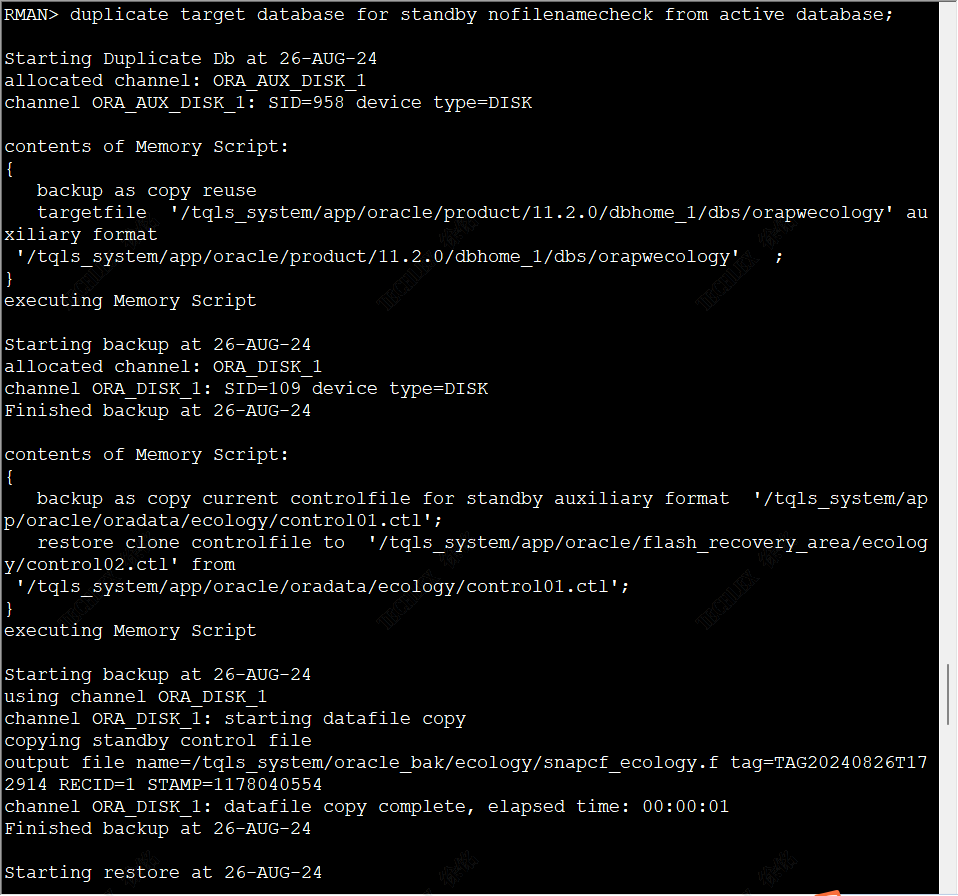 * + 1. 12)将备库置于active dataguard模式下 1. 1)查询备库状态 1. [oracle@oa-db-standby ~]$ sqlplus / as sysdba 2. SQL*Plus: Release 11.2.0.1.0 Production on Tue Aug 27 08:23:13 2024 3. Copyright (c) 1982, 2009, Oracle. All rights reserved. 4. Connected to: 5. Oracle Database 11g Enterprise Edition Release 11.2.0.1.0 - 64bit Production 6. With the Partitioning, OLAP, Data Mining and Real Application Testing options 7. SQL> select open\_mode,database\_role,db\_unique\_name from v$database; 8. OPEN\_MODE DATABASE\_ROLE DB\_UNIQUE\_NAME 9. -------------------- ---------------- ------------------------------ 10. MOUNTED PHYSICAL STANDBY ECOLOGY\_STD 11. SQL> 2. 2)打开备库(Dataguard仅仅能启动备库到readonly模式) 1. SQL> alter database open read only; 2. alter database open read only 3. * 4. ERROR at line 1: 5. ORA-10458: standby database requires recovery 6. ORA-01152: file 1 was not restored from a sufficiently old backup 7. ORA-01110: data file 1: '/tqls\_system/app/oracle/oradata/ecology/system01.dbf' 8. SQL> SQL> SQL> 3. 3)先打开同步,在尝试启动到open read only,失败 1. SQL> alter database recover managed standby database using current logfile disconnect from session; 2. Database altered. 3. SQL> select open\_mode,database\_role,db\_unique\_name from v$database; 4. OPEN\_MODE DATABASE\_ROLE DB\_UNIQUE\_NAME 5. -------------------- ---------------- ------------------------------ 6. MOUNTED PHYSICAL STANDBY ECOLOGY\_STD 7. SQL> alter database recover managed standby database cancel; 8. Database altered. 9. SQL> alter database open read only; 10. alter database open read only 11. * 12. ERROR at line 1: 13. ORA-10458: standby database requires recovery 14. ORA-01152: file 1 was not restored from a sufficiently old backup 15. ORA-01110: data file 1: '/tqls\_system/app/oracle/oradata/ecology/system01.dbf' 16. SQL> 4. 4)检查备库的service名称和主库配置的不一致 1. [oracle@oa-db-standby ~]$ sqlplus / as sysdba 2. SQL*Plus: Release 11.2.0.1.0 Production on Tue Aug 27 09:55:16 2024 3. Copyright (c) 1982, 2009, Oracle. All rights reserved. 4. Connected to: 5. Oracle Database 11g Enterprise Edition Release 11.2.0.1.0 - 64bit Production 6. With the Partitioning, OLAP, Data Mining and Real Application Testing options 7. SQL> show parameter name 8. NAME TYPE VALUE 9. ------------------------------------ ----------- ------------------------------ 10. db\_file\_name\_convert string 11. db\_name string ecology 12. db\_unique\_name string ECOLOGY\_STD 13. global\_names boolean FALSE 14. instance\_name string ecology 15. lock\_name\_space string 16. log\_file\_name\_convert string 17. service\_names string ECOLOGY\_STD 18. 主库 19. [oracle@OA-DATABASE-PRD2022 ~]$ sqlplus / as sysdba 20. SQL*Plus: Release 11.2.0.1.0 Production on Tue Aug 27 09:47:50 2024 21. Copyright (c) 1982, 2009, Oracle. All rights reserved. 22. Connected to: 23. Oracle Database 11g Enterprise Edition Release 11.2.0.1.0 - 64bit Production 24. With the Partitioning, Oracle Label Security, OLAP, Data Mining, 25. Oracle Database Vault and Real Application Testing options 26. SQL> show parameter archive\_dest\_; 27. NAME TYPE VALUE 28. ------------------------------------ ----------- ------------------------------ 29. log\_archive\_dest\_1 string location=use\_db\_recovery\_file\_ 30. dest valid\_for=(all\_logfiles, 31. all\_roles) db\_unique\_name=ecol 32. ogy 33. log\_archive\_dest\_10 string 34. log\_archive\_dest\_11 string 35. log\_archive\_dest\_12 string 36. log\_archive\_dest\_13 string 37. log\_archive\_dest\_14 string 38. log\_archive\_dest\_15 string 39. log\_archive\_dest\_16 string 40. NAME TYPE VALUE 41. ------------------------------------ ----------- ------------------------------ 42. log\_archive\_dest\_17 string 43. log\_archive\_dest\_18 string 44. log\_archive\_dest\_19 string 45. log\_archive\_dest\_2 string service=ECOLOGY\_STD.OA-DB-STAN 46. DBY lgwr sync valid\_for=(onlin 47. e\_logfile,primary\_role) db\_uni 48. que\_name=ECOLOGY\_STD 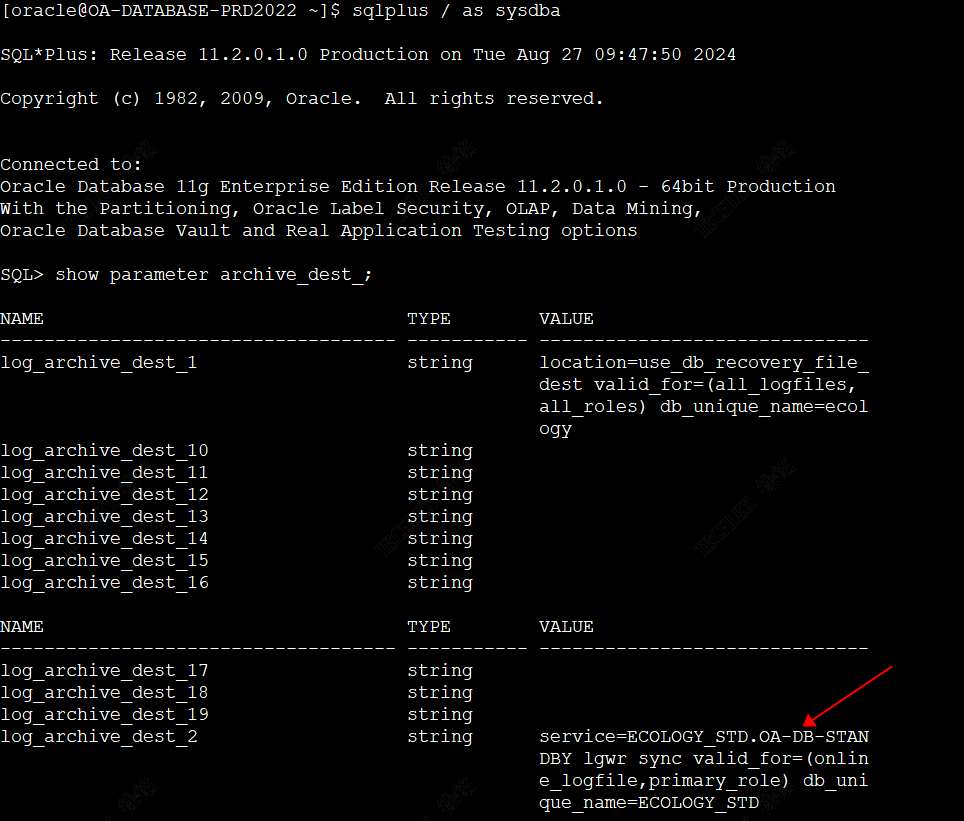 * + - 1. 5)修改主库的log\_archive\_dest\_2 1. alter system set log\_archive\_dest\_2 = 'service=ECOLOGY\_STD lgwr sync valid\_for=(online\_logfile,primary\_role) db\_unique\_name=ECOLOGY\_STD'; 2. 6)启动备库到open read only 1. SQL> alter database recover managed standby database cancel; 2. SQL> alter database open read only; 3. SQL> alter database recover managed standby database using current logfile disconnect from session; 4. SQL>
徐铭
2024年8月30日 09:09
转发文档
收藏文档
上一篇
下一篇
手机扫码
复制链接
手机扫一扫转发分享
复制链接
Markdown文件
Word文件
PDF文档
PDF文档(打印)
分享
链接
类型
密码
更新密码
有效期